
Blog posts tagged "snapcraft.io"

If you’re a snap developer, you know that snap development is terribly easy. Or rather complex and difficult. Depending on your application code and requirements, it can take a lot of effort putting together the snapcraft.yaml file from which you will build your snap. One of our goals is to make snap development practically easier

One of the defining features of snaps is their strong security. Snaps are designed to run isolated from the underlying system, with granular control and access to specific resources made possible through a mechanism of interfaces. Think of it as a virtual USB cable – an interface connects a plug with a slot. Security and

You’d think we would be running out of terrible/great (delete as applicable) 80s songs to try and shoehorn into the titles of these blog posts. Turns out, not quite yet! “How can I help?” is a phrase often used in Open Source projects by enthusiastic users and developers. There are a lot of moving parts

Snapcraft channels and, consequently, tracks are an important, highly useful element of the snap ecosystem. Tracks enable snap developers to publish multiple supported releases of their application under the same snap name. All snaps must have a default track – called latest, but there can be many others, giving both developers flexibilit

Sometimes, you may wonder, what’s on the other side of the curtain? If you’re a developer contemplating snaps, you surely want to know the range of tools and options available in the developer account dashboard in the Snap Store. But some of the features may not necessarily be immediately visible or relevant until you’ve uploaded
Block ads and trackers, and regain full control of your network. The AdGuard Home Ubuntu Appliance is an easy way for anyone to shield their WiFi network, and all the devices in their home from hackers and prying eyes online. In this post, we discuss what AdGuard Home is, some of the benefits and features

The snapcraft CLI (the tool used to create snaps) has long had support for building snaps that use both ROS 1 and ROS 2. ROS 2 Foxy Fitzroy is the latest ROS 2 LTS, which runs on Ubuntu 20.04 (Focal Fossa). The snapcraft CLI recently gained experimental support for building Foxy snaps, so I wanted

Uno Platform is bringing their support to Linux. Uno allows you to build native mobile, desktop, and WebAssembly apps with C# and XAML from a single code base. You can build Linux applications with Uno using Visual Studio and Ubuntu on WSL. In collaboration with Uno, we built a mock-up snap that measures and adjusts

Snaps come in many shapes and forms: security tools, productivity apps, games, handy utilities, video editing software, and more. Often, most snap package a single application. But snaps can also include services, databases, as well as multiple binaries. How far can this concept scale, you ask? Quite far. There are also some rather unique

Updates are an integral part of the software lifecycle. Quite often, they bring improvements, vital security patches – and sometimes, unfortunately, bugs, too. In mission-critical environments, it is important to assert a high degree of oversight and precision over updates. Snaps come with a built-in automatic update mechanism, whereby sn
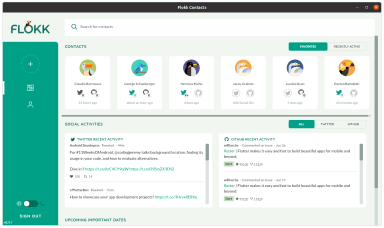
By Chris Sells (Google) & Ken VanDine (Canonical) Google’s goal for Flutter has always been to provide a portable framework for building beautiful UIs that run at native speeds no matter what platform you target. To validate this capability, we started by focusing on the mobile platforms, Android and iOS, where we’ve seen more than
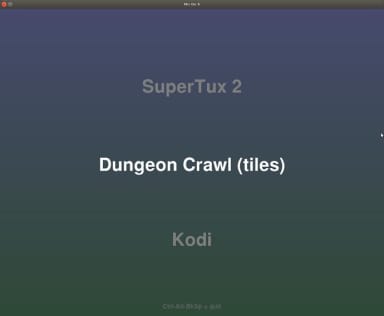
Mircade: An example snap confined user shell There are various scenarios and reasons for packaging a Snap confined shell and a selection of applications together in a confined environment. You might have applications that work well together for a particular task; or, you may want to offer a number of alternative applications and have them

The wheel of software turns, and apps come and go. But the end of development does not always mean the end of usefulness. Sometimes, programs stubbornly remain around, offering a complete experience that can withstand the test of time. Several weeks ago, we talked about how you can preserve old applications with snaps. Today, we

Broadly speaking, most snaps in the Snap Store fall into one of two categories, desktop applications and server daemons. The graphical applications such as Chromium and Spotify use desktop files, which ensure they can be opened on demand by any user via a menu or launcher. The server applications such as NextCloud and AdGuard-Home typical

The state of being productive comes in various guises. Sometimes, you want to do more. Sometimes, you want less. It’s been a while since we toured the Snap Store, and we thought you would be interested in a fresh batch of cool, fun and useful applications that can help you perfect your daily digital activities.

There are many ways one can go about building snaps. You can do it on your local system, by manually running commands in a terminal window. If you have a developer account in the Snap Store, you can use the integrated build functionality to create snaps. You can also use Launchpad, Electron Builder or a