
Blog posts tagged "Tutorial"

In a previous post, I explained how we made our Ubuntu image 15 times smaller by chiselling a specific slice of Ubuntu for .NET developers. In this blog, I will provide step-by-step instructions on customising your chiselled Ubuntu base images for any use case. Chiselled Ubuntu containers combine Distroless and Ubuntu to create smaller, m

Are you looking for an open source cloud platform and you don’t know where to start? Are you getting lost in all the independent rankings and cloud platform comparison pages? Try OpenStack and get your open source cloud platform up and running today. OpenStack works at any scale: from a single workstation to thousands of

It has been a while since we talked about how to build snaps. In the past, we went through a number of detailed examples, focused on different programming languages and the use of various useful components that can be declared in snapcraft.yaml, like extensions, stage packages, layouts, and more. Today, we want to give you
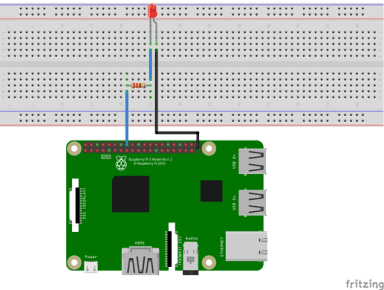
We are proud to announce that Ubuntu 21.04 includes support for the GPIO pins on the Raspberry Pi. This has been a long time coming. We know. With support for the camera modules and Bluetooth added last year GPIO was the obvious next step. But with our Raspberry Pi focused engineers working to make sure

10 minutes tutorial on how to set up Ubuntu for machine learning, data science and data analytics using NVIDIA RAPIDS, NGC Containers and Anaconda.

The new High Quality (HQ) camera from the people over at Raspberry Pi is now available. And as they say, it is really rather good. It has the option for interchangeable lenses, a 12 MP sensor, a distinct improvement from the previous 8MP V2 camera, and a tripod screw mount. In this post, I’ll walk
The Raspberry Pi Foundation recently released their new “Raspberry Pi Imager” and we love it. It’s a new tool that makes getting going with the Raspberry Pi easier than ever. All it takes is a simple install and three clicks before you have an SDcard ready for Pi. In this article, I’m going to talk
The ROS 2 Tooling Working Group (chaired by AWS RoboMaker) has been hard at work producing a neat set of GitHub Actions for building and testing ROS packages on a variety of different systems. They work great on Ubuntu targets and preliminary support is already present for MacOS and Windows, making them a great option
The end of 2019 brings about the latest ROS 2 release – Eloquent Elusor. Despite an ever growing set of features and some changes throughout the ecosystem, packaging with snaps is as easy as always. Let’s go through a quick example! Prerequisites You’ll need two tools: “snapcraft,” the program that builds snaps, and “multipass,” the
A well configured linter can catch common errors before code is even run or compiled. ROS 2 makes it easy to add linters of your choice and make them part of your package’s testing pipeline. We’ll step through the process, from start to finish, of adding a linter to ament so it can be used
One of the most common complaints from developers moving into large Python codebases is the difficulty in figuring out type information, and the ease by which type mismatch errors can appear at runtime. Python 3.5 added support for a type annotation system, described in PEP 484. Python 3.6+ expands this with individual variable annotation
Ubuntu OS is open source, with a whole community working to shape and support it. Here are some resources from the Ubuntu community for the Ubuntu community.

OpenStack is the de facto open source standard to build private and public clouds. We believe deploying and getting familiar with OpenStack should be an easy task for all developers, that’s why we have built conjure-up, a simple interface to deploy big software with best practices built-in. In this tutorial, you will learn how to
Chromebooks have gained popularity as relatively inexpensive web-centric laptops. They give access to web-based and native applications through the Chrome store, but what if you want to do more with them? Installing Ubuntu on a Chromebook gives you more choice and lets you turn a web-centric machine into any other laptop: you can install
![Your first robot: Introduction to the Robot Operating System [2/5]](https://res.cloudinary.com/canonical/image/fetch/f_auto,q_auto,fl_sanitize,w_384/https%3A%2F%2Fubuntu.com%2Fwp-content%2Fuploads%2F169e%2Fthumbnail.jpg)
This is the second blog post in this series about creating your first robot with ROS and Ubuntu Core. In the previous post we walked through all the hardware necessary to follow this series, and introduced Ubuntu Core, the operating system for IoT devices. We installed it on our Raspberry Pi, and used it to
Bullet-proof continuous delivery of software is crucial to the health of your community, more than a way to run manual tests, it also enables your early adopters to test code and give feedback on it as soon as it lands. You may be already using build.snapcraft.io to do so for snaps, but in some cases,